support@registrationkraft.com



Before doing business with a supplier, vendor, or company, it is important to verify their GST number. GST verification helps you confirm whether a business is registered under the Goods and Services Tax (GST) system and whether its registration is active. It can also help you identify incorrect registration details, avoid dealing with potentially fraudulent businesses, and reduce the risk of errors in invoices and GST-related transactions.
For example, if a supplier provides you with a GST number for preparing an invoice or claiming eligible Input Tax Credit (ITC), you should verify the number before proceeding. Checking the registration status and return filing history can also help you assess the taxpayer’s compliance record.
In this article, we will explain how to check whether a GST number is valid and active using the official GST portal. We will also cover the key details you should review during the verification process.
GST Number Verification Process
To check these details, we will use the official GST portal.
Step 1: Visit the GST Portal
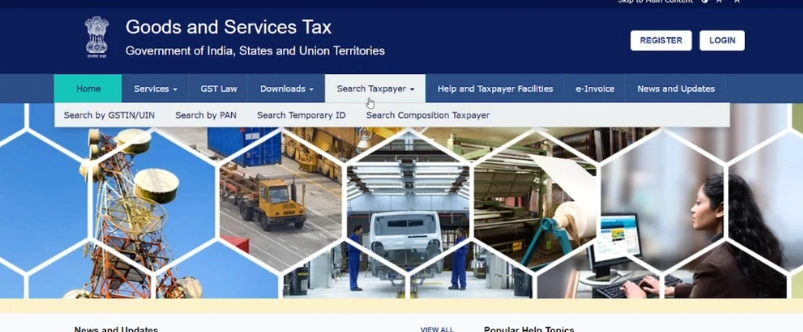
First, visit the GST portal. On the homepage, you will see options such as Home, Services, GST Law, Downloads, and GST Taxpayer. Click on Search Taxpayer. Under this section, you will find the options Search by GSTIN and Search by PAN. Since we want to verify a GST number, we will select the Search by GSTIN option.
Step 2: Enter the GST Number
After selecting the Search by GSTIN option, enter the GST number you want to verify. Now, Enter the GST number into the search field and fill in the captcha displayed on the screen.
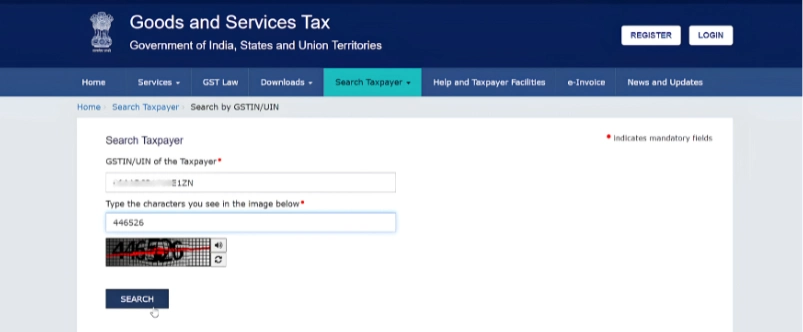
After entering the required details, click on the Search button.
Step 3: Check the GST Registration Details
Once you click on Search, the GST portal will display the registration details associated with the GST number. Click on the dropdown arrow to view more information.
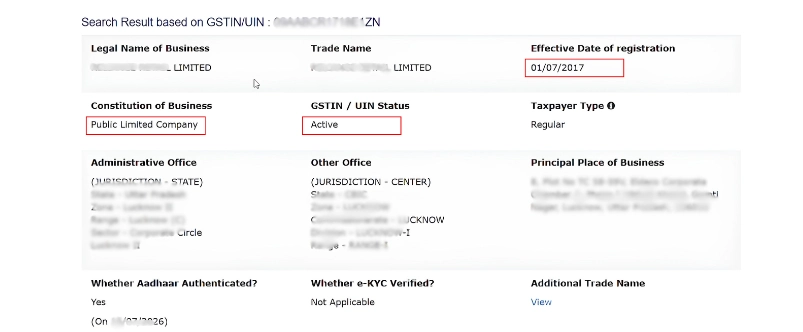
Here, you can check the legal name and trade name of the business.
In the case of a company, the legal name and trade name may be the same. However, in the case of a proprietorship, there can be a difference. The legal name is generally the name of the proprietor, while the name used for the business appears as the trade name.
You can also check the effective date of registration the type of business entity. In the above Image, the registration date displayed is 27 July 2017 and the business is listed as a public limited company.
Step 4: Verify the GST Registration Status
One of the most important details to check is the registration status. In the above image, the GST portal displays the status as Active. It also identifies the business as a regular taxpayer.
Checking the registration status helps you determine whether the GST registration is currently active. You should verify this information before relying on a GST number for business transactions.
Step 5: Check the Principal Place of Business
Next, check the principal place of business displayed on the GST portal.
You should compare the registered business address with the details provided by the person or company sharing the GST number. This can help you identify discrepancies in the registration information.
Step 6: Check Aadhaar Authentication Details
The GST portal also provides Aadhaar authentication details. You can view the Aadhaar authentication information displayed on the portal.
These details can provide additional information about the registration. However, you should not rely on Aadhaar authentication alone to determine whether a business is genuine.
Step 7: Check the Nature of Business Activities
Next, you can check the nature of the core business activities.
In the above image, the business activities include trading and retailing. The portal also displays information about the activities carried out by the business, including wholesale activities.
You can also check the HSN codes associated with the goods dealt with by the business.
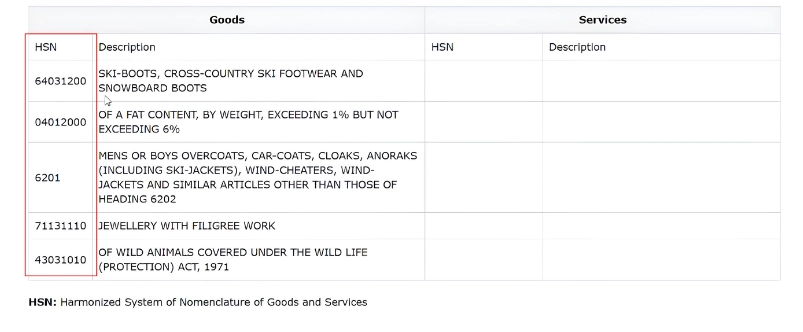
These details help you understand the type of business activities and goods associated with the GST registration.
Step 8: Check the GST Return Filing History
Another important step is to check the GST return filing history.
On the GST portal, click on the Show Filing Table option. This will allow you to view the taxpayer’s return filing details.
You can check whether the business has been filing its GST returns regularly and on time. The filing history can be reviewed month by month, including the returns filed for April, May, June, and other periods.
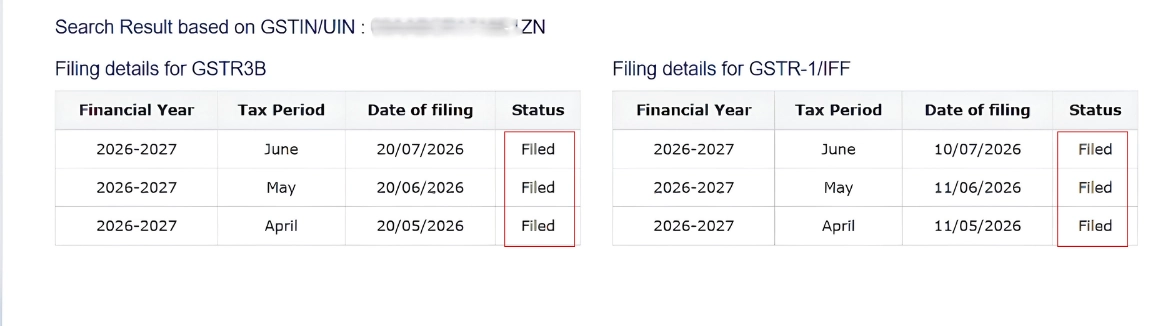
If a taxpayer has not filed returns for several months, you should examine the situation carefully. Prolonged non-filing may indicate compliance issues and, in some cases, can be associated with the cancellation or suspension of a GST registration.
Therefore, it is important to check the filing history before relying on a GST number for business transactions.
Step 9: Verify GSTR-3B and GSTR-1 Filing Details
The filing table also provides details about GSTR-3B and GSTR-1.
You can check whether the taxpayer has been filing these returns regularly on a monthly basis, wherever applicable.
In this example, the GSTR-3B filing details are displayed month by month. The GSTR-1 filing details are also available, allowing you to review the filing history.
By checking these details, you can get a better understanding of the taxpayer’s GST compliance record.
Conclusion
By following these steps, you can check whether a GST number is active and review the registration details of the associated business through the official GST portal.
You can verify the legal name, trade name, registration date, business status, principal place of business, nature of business activities, HSN codes, and GST return filing history.
However, an active GST number and a regular return filing history do not, by themselves, guarantee that a business is genuine or that every transaction is legitimate. You should also verify the supplier’s identity, invoices, business details, and other relevant information before entering into a transaction.
I hope this explanation helps you understand how to search for and verify a GST number through the GST portal.