support@registrationkraft.com




If you want to withdraw PF money, or if you are earning interest from a bank or any other income where TDS may be deducted, earlier the government gave an option to submit Form 15G or 15H so that TDS would not be deducted.
But now Form 15G and 15H have been discontinued. A new form has been introduced—Form 121. You need to fill this form and submit it to the source from where you are receiving income. Just Like, Form 15CA has been replaced by Form 145.
In this article, I will explain how to download Form 121 form, how to edit it, and what details you need to fill.
What is Form 121 of Income Tax
Form 121 is a new income tax declaration form that has been introduced from 1 April 2026. It is used by individuals to inform banks or financial institutions that their total income is below the taxable limit, so TDS (Tax Deducted at Source) should not be deducted from their earnings.
Form 121 is used in situations where TDS may be deducted, such as fixed deposit (FD) interest, savings account interest, provident fund (PF) withdrawals, post office deposits, bonds, debentures, and other similar sources of income. By submitting this form, eligible individuals can ensure that no TDS is deducted from these incomes.

What is the Purpose of Form 121
The main purpose of Form 121 is to declare that your total income is below the taxable limit, and therefore, no tax should be deducted at source. It acts as a self-declaration submitted to financial institutions to prevent unnecessary tax deductions.
How to Fill Form 121 : Step by Step Process
Step 1: Download Form 121 from Income Tax Website
First, go to the Income Tax website (https://www.incometaxindia.gov.in/). On the top menu, you will see “Tax Laws & Rules.” Click on it, and then go to “Forms & Downloads.” Hover over it, and you will see “Income Tax Forms 2026.” Click on it.
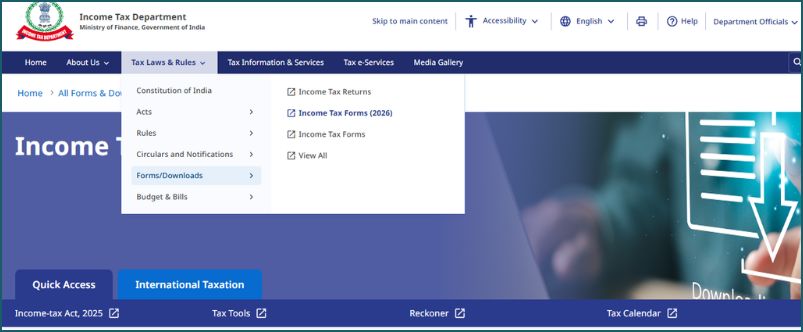
All newly released forms for 2026 will be displayed here. There are many forms (around 190), so use the search option and type “121.” You will find Form 121.
Currently, only the PDF version of the form is available. A fillable version may come later. Download the PDF file and open it.
You will see boxes to enter details, but the issue is that some text is already present, which cannot be removed easily. So first, convert the PDF into a Word file. After converting, open it in Word.
Step 2 : Understand Structure of Form 121
The form has four pages and is divided into two parts: Part A and Part B.
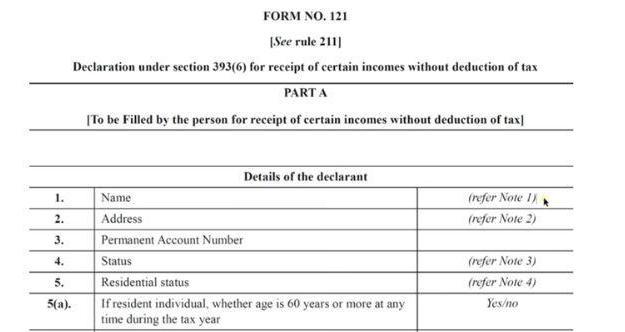 |
Part A is to be filled by the person receiving the income (for example, you). Part B is filled by the payer (like EPFO or bank).
Step 3: Fill Part A – Personal Details
In Part A, you will see “Details of Declarant.”
First is the Name field. Follow Note 1 for instructions. Enter your full name (first, middle, last) without titles like Mr., Mrs., etc. Use the name as per your PAN card.
Next is the Address field. Refer to Note 2. Include country, flat, road, district, state, PIN code, etc.
Then enter your PAN number correctly, otherwise the form may be rejected or higher TDS may apply.
Next is Status. Refer to Note 3. If you are an individual, write “Individual.” If you are filing on behalf of a company or firm, mention accordingly.
Then enter Residential Status (usually “Resident”).
Next, answer whether your age is 60 years or more during the tax year. If yes, write “Yes,” otherwise “No.”
Enter your email ID and contact number (with country code +91).
Then enter the Tax Year (for example, 2026–27).
Step 4: Enter Income Details
Now comes income details.
In Row 9, mention the Nature of Income. For example:
- PF Withdrawal
- Bank Interest
- Dividend
In Row 10, enter the estimated income for which you are submitting this form.
In Row 11, mention how many Form 121 you have already submitted in the same tax year for other incomes (if any), and the total estimated income from those forms.
If none, enter zero.
In Row 12, enter the total income by adding Row 10 and Row 11.
In Row 13, mention your total estimated income for the entire tax year, including other incomes like business income, capital gains, etc.
Next, provide details of ITR filed in the last two years (if applicable).
Step 5: Complete Declaration and Signature
Then comes the Declaration section:
- Write your name
- Enter your PAN number
- Mention the tax year in two places
Then fill in:
- Place
- Date
- Signature
Part A is now complete. Do not fill Part B—it will be filled by the payer.
For signature, you have two options:
- Print the form, sign it, and scan it
- Sign on blank paper, take a photo, remove background, and insert it into the Word file
Finally, convert the Word file back into PDF and save it. Before sending or uploading, verify all details carefully.
That’s how you download, prepare, and fill Form 121.
Conclusion
In simple terms, Form 121 is a modern replacement for Forms 15G and 15H that allows individuals with low income to avoid TDS deductions. It simplifies the process by combining earlier forms into one and making it easier to fill and submit digitally.
Also Read: How to fill form 15g for pf withdrawal